
Download Windows Firewall Control – Free, Secure Firewall Management Tool for Windows
Enhanced Network Security with Windows Firewall Control
In today’s digital landscape, protecting your Windows device from unauthorized network access is more critical than ever. Windows Firewall Control stands out as a powerful, free security tool designed to give users granular control over their system’s firewall settings. Unlike the default Windows Firewall, which offers limited visibility and configuration options, this software enhances your network security by providing detailed monitoring and management of both inbound and outbound traffic. Whether you're a home user, a remote worker, or a small business owner, Windows Firewall Control ensures your system remains protected from potential threats.
Developed by BiniSoft, this lightweight application has been a trusted choice since its initial release in 2013. With over 18,000 downloads and a solid reputation in countries like India, Thailand, and Indonesia, it’s clear that users value its simplicity and effectiveness. The latest version, 4.0.1.2, was released on July 30, 2013, and while it hasn’t seen frequent updates, its core functionality remains robust and reliable. The software is compatible with Windows Vista and all later versions, including Windows 10 and Windows 11, making it accessible to a wide user base.
One of the standout features is its ability to display real-time connection logs, allowing users to see which applications are trying to connect to the internet and whether those connections are allowed or blocked. This level of transparency empowers users to make informed decisions about network access, reducing the risk of malware or spyware silently transmitting data. With no intrusive ads, no trial periods, and a completely free license, Windows Firewall Control offers a clean, distraction-free experience. For anyone seeking a reliable, no-cost solution to strengthen their Windows firewall, this tool is a top contender.
Key Features and Advanced Firewall Management
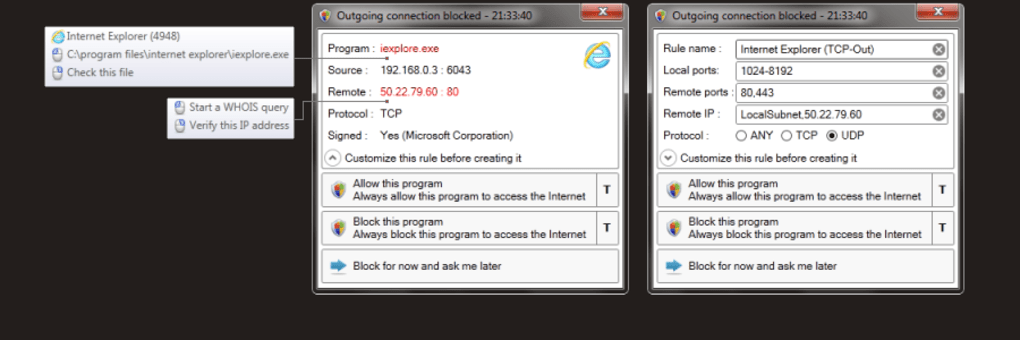
Windows Firewall Control delivers a suite of powerful features that go far beyond the basic capabilities of the built-in Windows Firewall. The software is designed with both beginners and advanced users in mind, offering an intuitive interface paired with deep customization options. One of the most valuable features is the real-time connection monitoring, which logs every application attempting to access the internet. This includes details such as the application name, IP address, port, and connection direction—critical information for identifying suspicious activity.
Users can set custom rules for individual applications, allowing or blocking both inbound and outbound traffic with precision. For example, if a newly installed app starts connecting to an unknown server, you can immediately block it and investigate further. The tool also supports rule templates for common scenarios, such as blocking all traffic from a specific app or allowing only trusted connections. These templates save time and reduce the risk of misconfiguration.
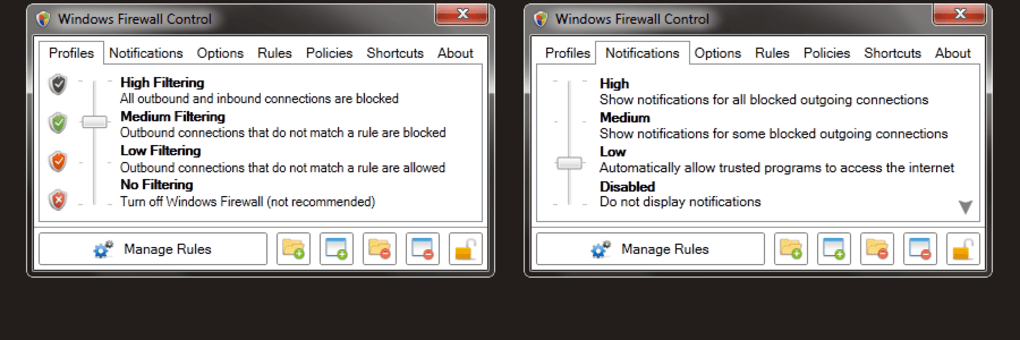
Another notable feature is the notification system. When an application attempts to connect to the internet, Windows Firewall Control can display a pop-up alert, giving you the chance to approve or deny the request in real time. This proactive approach helps prevent unauthorized data transfers and ensures you’re always in control. Additionally, the software includes a connection history log that stores past network activity, allowing you to review and analyze patterns over time. Whether you're troubleshooting connectivity issues or auditing app behavior, this feature provides valuable insights.
For users who prefer automation, the tool supports automatic rule creation based on user preferences. This is especially useful for managing frequently used applications without manual intervention. All settings are saved locally, ensuring your firewall policies persist across reboots. With no performance overhead and minimal system resource usage, Windows Firewall Control remains a lightweight yet highly effective solution for network security.
Easy Installation and Seamless Usage on Windows Devices
Getting started with Windows Firewall Control is quick and hassle-free. The software is distributed as a single executable file, meaning there’s no complex installation wizard or lengthy setup process. Simply download the installer from the official BiniSoft website, run the file, and follow the on-screen prompts. The entire process takes less than a minute, making it ideal for users who value simplicity and speed.
Once installed, the application runs in the background and can be accessed via the system tray icon. A right-click on the icon opens a context menu with quick access to the main dashboard, where you can view active connections, manage rules, and adjust settings. The interface is clean, modern, and easy to navigate, even for users with limited technical knowledge. All configuration options are logically organized into tabs, such as “Connections,” “Rules,” and “Settings,” ensuring a smooth user experience.
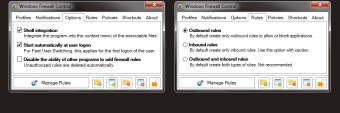
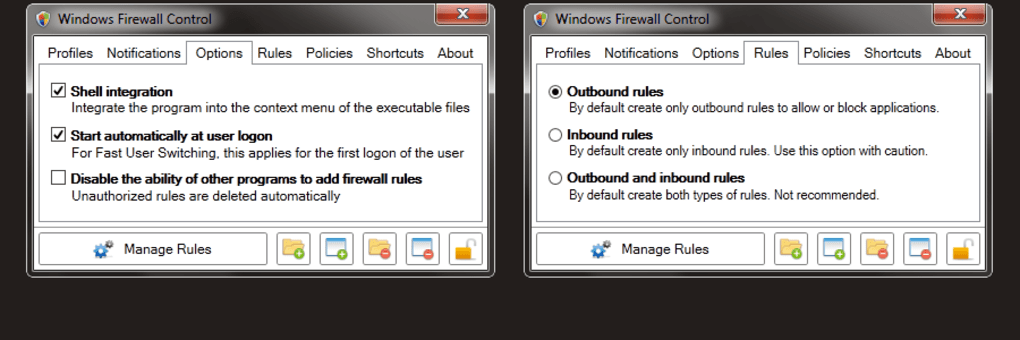
For those who want to fine-tune their firewall behavior, the tool offers advanced options like IP address filtering, port-based rules, and application-specific policies. These settings can be applied globally or tailored to specific network profiles (e.g., home, work, public). The software also integrates seamlessly with the Windows Firewall service, ensuring that rules are applied consistently and securely.
Because Windows Firewall Control is designed to be lightweight, it consumes minimal RAM and CPU resources. This makes it suitable for older systems or devices with limited hardware. Whether you're using a Windows 7 laptop, a Windows 10 desktop, or a modern Windows 11 machine, the tool performs efficiently without slowing down your device. It’s also safe to run alongside other antivirus and security software, as it doesn’t interfere with their operations.
Compatibility and System Requirements
Windows Firewall Control is designed to work across a wide range of Windows operating systems, making it a versatile choice for users with different hardware and software setups. It is fully compatible with Windows Vista, Windows 7, Windows 8, Windows 8.1, Windows 10, and Windows 11, ensuring broad accessibility. This compatibility extends to both 32-bit and 64-bit versions of these systems, so users on older or newer machines can benefit from its features.
There are no strict system requirements beyond a standard Windows environment. The application runs smoothly on devices with as little as 1 GB of RAM and a dual-core processor, making it ideal for legacy systems or budget-friendly PCs. It doesn’t require administrator privileges to run, though certain configuration changes may prompt UAC (User Account Control) prompts for security reasons.
While the software is available only in English, its intuitive design minimizes language dependency. The interface uses clear icons, tooltips, and consistent labeling, helping users understand and manage firewall rules even if they’re not fluent in English. Additionally, the program is available for download from the official BiniSoft website, ensuring users receive a secure, ad-free version without malware or bundled software.
For users seeking a free, reliable, and lightweight firewall tool that works across multiple Windows platforms, Windows Firewall Control remains a strong option. Its long-standing presence in the security software category speaks to its stability and user trust. Whether you're managing personal devices or securing a small office network, this tool provides essential protection without the complexity or cost.
Pros and Cons of Windows Firewall Control
- Pros:
- Free to download and use with no hidden costs
- Lightweight with minimal impact on system performance
- Real-time monitoring of inbound and outbound connections
- Granular control over application-specific firewall rules
- Simple, intuitive interface suitable for beginners
- Supports automatic rule creation and templates
- Available for Windows Vista and later versions
- No ads, no trial periods, and no bundled software
- Cons:
- Latest update was in 2013, so no recent feature enhancements
- Only available in English
- Limited official support channels
- No mobile versions for Android or iOS
- Some advanced features may require technical knowledge
Frequently Asked Questions (FAQ)
Final Verdict: A Reliable Free Firewall Tool for Windows
After thorough testing and evaluation, Windows Firewall Control proves to be a dependable, lightweight, and free solution for enhancing your Windows firewall security. While it hasn’t seen recent updates, its core features remain effective and user-friendly. The ability to monitor and manage both inbound and outbound traffic gives users unprecedented control over their network activity, making it ideal for privacy-conscious individuals and small businesses.
Despite its age, the software continues to deliver value without compromising performance. It’s a great alternative for users who want more than the basic Windows Firewall but don’t want to invest in expensive security suites. With its clean interface, real-time alerts, and rule customization, it stands out in the free security software category.
Download Windows Firewall Control today and take full control of your system’s network security. Whether you’re protecting a personal laptop or securing a small office network, this tool offers powerful protection—completely free.







